Tampilkan postingan dengan label on. Tampilkan semua postingan

Create non adhoc hotspot on Fedora 18

Sabtu, 07 Juni 2014

This is a screenshot of my terminal after I started the hotspot
UPDATE 2: TO MAKE THE SCRIPT WORKING I INSTALLED DHCP! ALSO, I  CAN RECOMMEND ANOTHER TUTORIAL ABOUT CREATING A HOTSPOT! YOU CAN FIND IT HERE

UPDATE: I SAW A PROBLEM! I DONT KNOW YET WHY, BUT IF YOU RUN THE SCRIPT, THE ANDROID TERMINAL FIND THE NETWORK BUT WHEN TRYING TO CONNECT IT STOPS AT OBTAINING IP ADDRESS. ILL TRY TO FIND WHY THIS HAPPENS...
Ok, I installed Fedora 18 on my laptop, I can say that I returned to the Linux distribution that I always loved, and I found a problem. I didnt know how to create a non ad-hoc hotspot.
So I tried the method that worked for me on Ubuntu and about I wrote an article HERE and I found that also work on Fedora, with a few modifications.
I should post the modified code:


1. install hostapd and dnsmasq by typing sudo yum install hostapd dnsmasq
2. stop those services: sudo service hostapd stop and sudo service dnsmasq  stop
3. configure the dnsmasq.conf by typing sudo gedit (or other text editor) /etc/dnsmasq.conf:
# Bind to only one interface
bind-interfaces
# Choose interface for binding
interface=wlan0
# Specify range of IP addresses for DHCP leasses
dhcp-range=192.168.150.2,192.168.150.10
4. configure the hostapd.conf: sudo gedit /etc/hostapd/hostapd.conf
# Define interface
interface=wlan0
# Select driver
driver=nl80211
# Set access point name
ssid=myhotspot
# Set access point harware mode to 802.11g
hw_mode=g
# Set WIFI channel (can be easily changed)
channel=6
# Enable WPA2 only (1 for WPA, 2 for WPA2, 3 for WPA + WPA2)
wpa=2
wpa_passphrase=mypassword
5. create a bash file and paste the following code:
#!/bin/bash
Start
# Configure IP address for WLAN
sudo ifconfig wlan0 192.168.150.1
# Start DHCP/DNS server
sudo service dnsmasq restart
# Enable routing
sudo sysctl net.ipv4.ip_forward=1
# Enable NAT
sudo iptables -t nat -A POSTROUTING -o ppp0 -j MASQUERADE
# Run access point daemon
sudo hostapd /etc/hostapd/hostapd.conf
# Stop
# Disable NAT
sudo iptables -D POSTROUTING -t nat -o ppp0 -j MASQUERADE
# Disable routing
sudo sysctl net.ipv4.ip_forward=0
# Disable DHCP/DNS server
sudo service dnsmasq stop
sudo service hostapd stop
6. grant permissions and run the script!
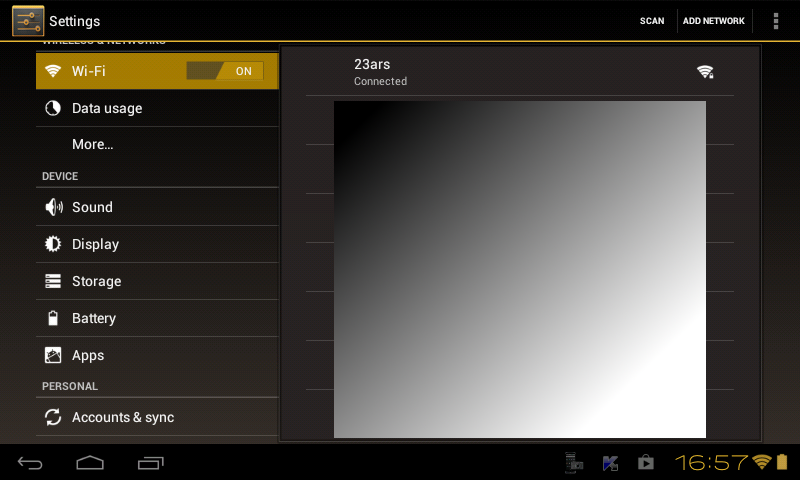
This is a screenshot from my tablet!


Read More..

Try Android 2 2 Froyo On Your Computer How to Android

Rabu, 12 Maret 2014


Googles next version of Android, 2.2 "Froyo", is obviously a huge step, and weve done what we can to explain whats so great about it. But enough reading, why not try it for yourself?


Nexus One owners are reporting early Froyo updates already, but chances are, you dont own a Nexus One. Any mobile OS with apps has an SDK—a developer kit—which gives devs the tools needed to create and test apps for the platform. And any good SDK comes with an emulator for the OS itself, so devs can test apps without actually installing them on a phone. Apples got one, but it only works on Macs. Microsofts got one, but it only works on PCs. Googles Android emulator, on the other hand, works on any platform, and its totally free. Heres how to load up Android Froyo on your desktop in just a few minutes.

How to Set Up the Emulator

First, youll need:

• The Android SDK (Windows, Mac)
• A reasonably powerful computer (netbooks will strain to emulate a smartphone)

Then:

1. Extract the Android SDK. You should see a collection of folders and files including names like Platforms, Add-ons and Tools


2. In the Tools folder, open an app or script called Android. This will start the SDK manager app.

3. In the manager app, click the Available Packages button in the left column. This should present you with single option for download. This is a repository; downloading it will do nothing but give you new download options, so go ahead and do that.


4. From the new download list, select and download the following four items (This will take a few minutes—youre downloading the actual OS here, as well as some extra tools):


5. Once the downloads are completed and installed, navigate back to the "Virtual Devices" section in the left column of the SDK manager. On the right side of the window, click New.

6. This is the windows where you can define the parameters of your imaginary, emulated Android phone. Aside from the mandatory Android 2.2 target setting, youll need to decide on a few settings. You can get by with a small virtual SD card, so feel free to set that at a few hundred megabytes. For the screen resolution, dont necessarily choose the highest setting (WVGA854)—its 854 pixels tall, which may be taller than your computers screen, if you have a MacBook or other smaller widescreen notebook.


7. Click Create AVD. Your computer might lock up for a second, and the app may become unresponsive for a bit longer than that, but dont worry—just let it do its thing.


8. Now, under Virtual Devices, youll have a simulated Android phone. Select your phone, and click Start. (Startup can take a little while. If its not done in two or three minutes, try again, or create a new virtual device.)


Aaaaand thats it: Youre in Android Froyo! Look around a little.
Uhh, Where Are the Apps?

Right, so what youre using now is barebones Android 2.2. This is the raw, open source core of the OS, recognizable as Android 2.2, but missing a lot of little pieces, including close-source apps like Google Maps. You wont be able to test out Flash, for example, but luckily, you can install all manner of other apps. Heres how, according to Google:
  • Download a development tool called Eclipse (you want the IDE for Java Developers at this link)
  • Install the Android Development Toolkit in Eclipse
  • Point the ADK to the directly where youre keeping your Android SDK files (the same place where you extracted the SDK earlier, unless you moved it)
  • Import and run Android apps. (Youll have to search the internet for Android apps you want to try. The file format is .apk, and many sites host them independently of the Android market.)
source
Read More..

Dual Boot Windows Phone 7 and Android on the HTC HD2

Minggu, 09 Maret 2014

You may have heard that the HTC HD2 can be hacked to run both the Windows Phone 7 OS and the Android OS. But now it can run both...at the same time!

Ok, not really at the same time (Im sure youre imagining some sort of crazy WinPho7-Android mash-up), but from the same partitioned SD card.

The cool kids over at xda-developers have put up a tutorial on how to partition an SD card to run both Windows Phone 7 and Android. Its not exactly a one-step process, so they also went ahead and made a video:


[via pcworld]
Read More..

Download Tekken Card Tournament 1 044 on a apk for Android

Jumat, 10 Januari 2014

TEKKEN goes cross-platform free-to-play for the first time ever with TEKKEN CARD TOURNAMENT for smartphones, tablets and browsers. Now players can take TEKKEN with them everywhere and launch into seamless cross-platform card battles with skill-matched players from around the world.

Download Tekken Card Tournament 1.044

TEKKEN CARD TOURNAMENT features the stunning 3D visuals players expect from TEKKEN, with electrifying turn-based card battling that’s fun right from the start and loaded with satisfying depth. The launch of the physical TEKKEN CARD TOURNAMENT Game Cards early summer 2013 will bring real-world crossover to the gameplay, with unique QR codes letting players instantly add the card to their digital deck in-game, and Augmented Reality to bring the characters to life in players’ environments. Now players can give their TEKKEN iron fist a workout anytime, anywhere.

Read more about Tekken Card Tournament 1.044 >> https://play.google.com/store/apps/details?id=eu.namcobandaigames.tekkencard

Download Tekken Card Tournament from Appsroids.com

Read More..

Download Mountain Moto Down Hill 1 2 on a apk Format For Android

Rabu, 08 Januari 2014

Really challenging stunt bike game! Here you have to ride through the downhill and perform stunts! Riding bikes has never been more fun than in this motorcycle game because this time you will be riding downhill and gaining loads of speed as you come closer and closer to the finish line. Be careful though as too much speed might not be the best thing when you run into the obstacles but you will definitely make use of it when you are hitting the jumps. Make sure to collect as many stars as possible and with them you can buy more powerful bikes and better looking ones as well. You can also complete cool achievements! Have fun and try not to crash all your three lives.Control your bike with arrow keys. Enjoy!

Mountain Moto : Down Hill apk

Note:
This app is supported via search. Please note that the following will be added to your device once you download the app – Search icon, bookmark link and browser homepage. You can delete/replace these search points easily. This is a way to make money from this app and giving it to you for free. Thank you for your understanding.

Read More..

Celebrating teachers on National Teacher Day

Minggu, 08 September 2013

One of the best parts of my job working on the Google Education team has been hearing inspiring stories time and again of great teachers who build strong relationships with and bring out the best in their students. We recognize that there are many factors that can impact a students ability to learn, and that technology can be a valuable assistant in overcoming educational barriers, but that it’s really teachers, not technology, who help students realize their full potential. In honor of National Teacher Day today in the U.S., we wanted to showcase a few amazing stories of dedicated teachers who have shown us how they used technology to make learning magical for their students.

At Eastfield Global Magnet School in North Carolina, seventh-grade teacher Elaine Waters was looking for a way to help a student of hers named Malachi, who struggled when it came to putting pen to paper. Elaine decided to have Malachi try using a Chromebook to write—watch what happened below:


Across the country at Xavier College Prep in Arizona, beloved history teacher Gina Nunez had to take a medical leave of absence. With her students panicking over their final exam, Gina found a way to help them study from afar:


Well be posting more of these stories on our Google in Education +page and encourage you to share your stories in the comments. We’re always eager to hear about excellent educators who have used technology in ways small and large to make a difference in the lives of students. If youre interested in learning about more ways to integrate technology in school, you can watch recordings from our first Education On Air conference, a free education technology conference held entirely online from our Google in Education page last week. Watch the sessions on our YouTube channel.

Thanks to all the creative teachers out there who find a way to spark each student’s passion—we hope to hear more stories from you soon.

Read More..

Segar Merona Dengan Blus On

Jumat, 28 Juni 2013

Hmm... Untuk wanita dengan kulit putih, Anda dapat gunakan blush on dengan nuansa warna pink dan warna senada yang akan membuat wajah terlihat lebih segar dan merona alami. Sedangkan, untuk yang memiliki warna kulit sawo matang, coba gunakan blush on dengan warna yang senada seperti coklat muda, orange atau bronze. Wajah akan terlihat lebih eksotis dan menarik.

Jenis Blush On

Jenis kulit menjadi salah satu pertimbangan ketika akan membeli atau menggunakan perona pipi. Hendaknya ketahui terlebih dahulu jenis kulit wajah Anda, apakah Anda termasuk yang berjenis kulit berminyak, normal atau kering. Kemudian Anda dapat memilih jenis blush on yang tersedia. Ada 4 jenis perona pipi atau blush on yang ada saat ini. Pilihlah yang sesuai dengan jenis kulit:
  • Padat

    Merupakan perona pipi yang paling umum dikenal. Serbuk warna perona pipi yang dipadatkan ini akan menghasilkan warna yang sangat nyata. Jenis ini dapat dipakai untuk semua jenis kulit, terutama untuk yang memiliki kulit berminyak karena akan mengurangi minyak yang ada selama dipakai.
  • Krim

    Bentuknya tidak sepadat blush on padat dan memiliki tekstur lebih basah. Karena tekstur inilah, maka warna yang dihasilkan dapat lebih menyatu alami dengan warna kulit wajah. Jenis ini kurang cocok digunakan seseorang yang berjenis kulit berminyak karena dapat membuat wajah terlihat lebih basah atau berminyak.
  • Gel

    Berbentuk gel dan warna yang dihasilkan tidak terlalu nyata sehingga cocok untuk pemakaian sehari-hari atau bila Anda ingin mengaplikasikan dandanan yang natural. Perona pipi gel ini cocok untuk Anda yang memiliki jenis kulit kering.
  • Balls

    Menyerupai bola-bola kecil. Cara menggunakannya adalah dengan menggunakan kuas yang diputar-putar di atas bola-bola tersebut. Serbuk yang menempel pada kuas kemudian dapat disapukan pada pipi. Dapat digunakan untuk semua jenis kulit.

Perona Pipi Berdasarkan Tipe Wajah

Selain membuat wajah terlihat lebih segar, blush on juga dapat membantu mengoreksi bentuk wajah sehingga akan menutupi kekurangan wajah. Bagi Anda yang memiliki bentuk wajah oval, hati, bulat, lonjong atau persegi, cobalah langkah-langkah berikut:
  • Wajah Oval

    Sapukan perona pipi pada puncak pipi dengan sedikit melenngkung atau tambahkan sedikit perona pipi pada tulang hidung untuk menimbulkan kesan glamor.
  • Wajah Bulat

    Agar wajah terlihat lebih ramping, lakukan teknik shading di daerah rahang. Gunakan perona pipi dengan warna sedikit lebih gelap dari bagian rahang hingga dagu. Lalu gunakan blush on dengan warna yang lebih terang pada puncak pipi ke arah telinga dengan gerakan keatas. Lakukan secara merata.
  • Wajah Lonjong

    Untuk bentuk wajah lonjong, jangan menggunakan perona pipi di bawah tulang pipi tetapi gunakan tepat pada tulang pipi dengan gerakan mendatar. Gunakan blush on dengan warna terang agar perhatian terpusat pada daerah pipi untuk menutupi agar wajah tidak terlihat lebih memanjang.
  • Wajah Persegi

    Gunakan blush on menjauh dari puncak pipi untuk memberi kesan mengangkat rahang. Untuk menyamarkan potongan rahang yang kuat, Anda dapat membubuhkan blush on dengan warna gelap dari dagu sampai tengah telinga.
  • Wajah Hati

    Pilih blush on yang berwarna sedikit gelap dan sapukan pada bagian sekitar dagu dan bagian rahang bawah. Untuk kesan cerah, Anda dapat menyapukan blush on berwarna terang dari puncak pipi ke arah samping.
Agar blush on dapat menempel lebih lama, sebaiknya gunakan blush on setelah menggunakan pelembab, alas bedak, bedak padat. Gunakan kuas blush on yang besar agar warna yang dihasilkan lebih merata. blush on juga dapat digunakan setelah Anda selesai dengan riasan mata dan bibir agar dapat menyatu dengan nuansa warna riasan wajah secara keseluruhan. Jangan lupa untuk memperhatikan umur kedaluwarsa kosmetik Anda dan pilihlah blush on atau perona pipi yang memiliki kandungan yang aman bagi wajah.
Read More..

Android Apk »Galaxy on Fire 2 v1 0 1 HD Samsung Apps

Rabu, 26 Juni 2013

Galaxy 2 v1.0.1 HD (Samsung Apps)

: Android 2.3+

: Enjoy Fishlabs Entertainment’s legendary sci-fi saga spectacular High Definition Android Apk »Galaxy on Fire 2 v1.0.1 HD (Samsung Apps) specifically optimized Samsung Galaxy S2 Note!

AN UNPRECEDENTED OUTER SPACE ADVENTURE

Galaxy 2™ HD action-packed 3D open space combat simulation elements. Take over hot-headed space war veteran Keith T. Maxwell from its impeding destruction hands alien raiders, ruthless space pirates -crazy madmen! Follow story line than 10 hours gameplay, off interplanetary journey own design. Due title’s unique mixture -driven, mission-based gameplay, turn away from story line whenever asteroid farmer, weapons dealer, space explorer, h Android Apk »Galaxy on Fire 2 v1.0.1 HD (Samsung Apps) any other intergalactic profession think of.

With its spectacular graphics, state-of-the-art visuals , Galaxy 2™ HD brings outer space adventure Samsung smartphone! Explore galaxy than 20 star systems, fly 30 customizable space ships, meet dozens alien characters, engage relations galaxy’s four major factions infinite number -curling missions! Burst through space guns blazing aflame!

TRUST

press loves Galaxy 2™ HD it “a adventure fan” (Appasnap, 9/10 points), “a great title hours ol’ fashioned space shooting ” (148 Apps, 4.5/5 points) and “a thoroughly enjoyable, entertaining experience” (Impulse Gamer, 89/100 points)!

HUNDREDS FEATURES

• A vast galaxy 20 star systems than 100 individual planets stations

• 30 customizable spaceships weapons systems, gadgets

• A unique mixture -driven, mission-based gameplay

• High-quality visuals including complex 3D models, hi-res textures -taking SFX

• 3D sound, orchestral soundtrack voice-acting (English)

• Customizable touch-and-tilt controls

• Action Freeze™: Take screenshots from any perspective them

• Native support 480×800 pixels Samsung Galaxy S2

JOIN

Get Galaxy 2™ fans through our official website, forums media profiles! We’re looking forward from you!

Official Galaxy™ Homepage - http://www.galaxyonfire.com/

Official Galaxy™ Newsletter - http://bit.ly/gof2-newsletter

Official Fishlabs Homepage - http://www.fishlabs.net/

Official Fishlabs Forums - http://forums.fishlabs.net/en

Official Galaxy 2™ HD Trailer - http://bit.ly/gof2-hd-trailer

Like us - http://www.facebook.com/fishlabs

Follow us - http://www.twitter.com/fishlabs

Check us out - http://www.youtube.com/fishlabsgames

HARDWARE REQUIREMENTS

Galaxy 2™ HD optimized Samsung Galaxy S2 Note.

/>

http://apps.samsung.com/earth/topApp...d=000000470615

Android Apk »Galaxy on Fire 2 v1.0.1 HD (Samsung Apps) Instructions:

http://uploaded.net/file/4snyty7o

Android Apk »Galaxy on Fire 2 v1.0.1 HD (Samsung Apps):

http://rapidgator.net/file/9613d8f8d...6b28e1bd02e2a/

http://turbobit.net/i43mynb9taun.html

Read More..